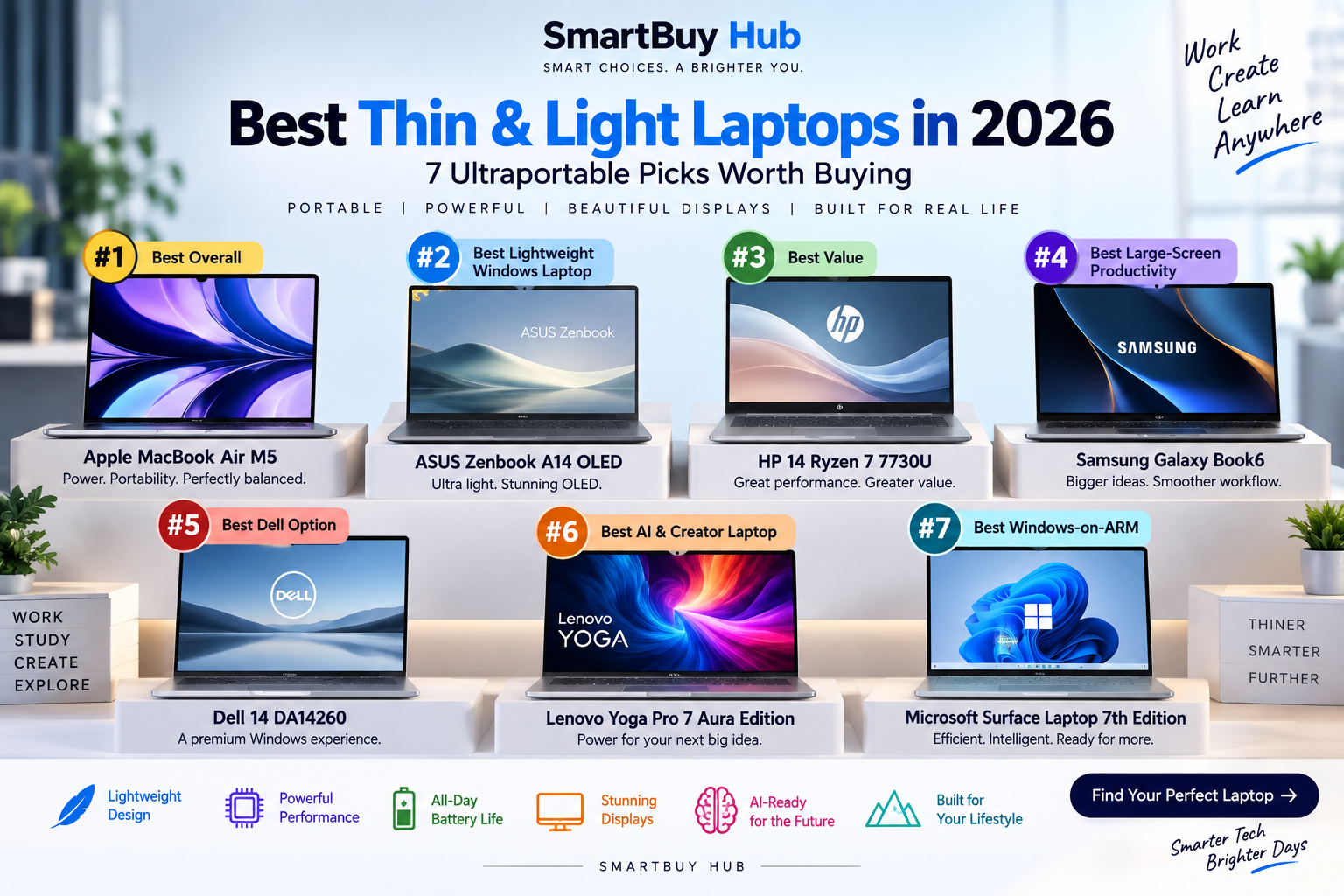
Best Thin & Light Laptops in 2026
7 ultraportable laptops compared for performance, battery life, displays, AI features and everyday productivity.
A thin and light laptop no longer has to mean weak performance. Today’s ultraportables can combine premium displays, fast processors, AI acceleration, excellent battery life and genuinely portable designs.
But the right laptop depends on what you actually need. A MacBook Air makes sense for someone who wants a quiet, lightweight everyday machine, while a powerful OLED Windows laptop may be better for creative work. ARM-based Windows laptops can offer excellent efficiency, while traditional x86 systems remain attractive for software compatibility.
We’ve selected seven different laptops to help you find the right balance between portability, performance, battery life and price.
🏆 Quick Picks
📊 Compare the 7 Laptops
| Laptop | Processor | RAM | Storage | Display | Best For |
|---|---|---|---|---|---|
| MacBook Air M5 | Apple M5 | 16GB | 1TB | 13.6″ Liquid Retina | Overall |
| ASUS Zenbook A14 | Snapdragon X | 16GB | 512GB | 14″ OLED | Portability |
| HP 14 | Ryzen 7 7730U | 16GB | 512GB | 14″ FHD | Value |
| Samsung Galaxy Book6 | Core Ultra 7 | 16GB | 512GB | 16″ 120Hz Touch | Productivity |
| Dell 14 DA14260 | Intel platform | Varies | Varies | 14″ class | Premium Windows |
| Lenovo Yoga Pro 7 Aura | Core Ultra 9 285H | 32GB | 1TB | 14.5″ 3K OLED | AI & creators |
| Surface Laptop 7th Gen | Snapdragon X Elite | 16GB | 512GB | 13.8″ PixelSense Touch | Windows ARM |
1. Apple MacBook Air M5
Apple MacBook Air 13-inch with M5
The MacBook Air M5 is our best overall pick because it combines Apple’s latest M5 processor with a compact 13.6-inch design, 16GB unified memory and 1TB SSD storage in the exact configuration we’re recommending.
It is a strong choice for students, professionals, writers, developers and creators who want a fast everyday laptop without a bulky chassis.
Best for
- Everyday productivity
- Students
- Professionals
- Light creative work
- People who prefer macOS
- Fast M5 chip
- Lightweight design
- 16GB memory
- 1TB SSD in this listing
- Excellent portability
- macOS compatibility differs from Windows
- Limited upgradeability
- Premium pricing
2. ASUS Zenbook A14 OLED
ASUS Zenbook A14 OLED
If portability is your number-one priority, the Zenbook A14 deserves serious attention. The supplied configuration uses a Snapdragon X processor, 16GB RAM, 512GB SSD and a 14-inch OLED display while weighing around 0.98kg.
That makes it particularly attractive for commuters, students and frequent travellers who want Windows without carrying a heavy machine.
Best for
- Frequent travel
- Students
- Office productivity
- Lightweight Windows computing
- Extremely light
- OLED display
- 16GB RAM
- Snapdragon efficiency
- USB4 connectivity
- ARM software compatibility should be checked
- 60Hz display
- Not designed for serious gaming
3. HP 14 Ryzen 7 7730U
HP 14 Ryzen 7 7730U
This HP 14 is the practical choice in our lineup. Instead of paying premium prices for an ultrabook, buyers get a Ryzen 7 7730U processor, 16GB DDR4 memory and a 512GB SSD in a 14-inch FHD design.
It is particularly suitable for office work, browsing, documents, study and general productivity.
Best for
- Students
- Office work
- Home users
- Everyday productivity
- Ryzen 7 processor
- 16GB RAM
- 512GB SSD
- Backlit keyboard
- More affordable positioning
- Not an OLED display
- Older DDR4 memory platform
- Not aimed at demanding creative workloads
4. Samsung Galaxy Book6
Samsung Galaxy Book6
The Galaxy Book6 takes a different approach to portability by giving you a much larger 16-inch touchscreen while keeping the design relatively slim.
The supplied configuration features Intel Core Ultra 7, 16GB RAM, 512GB SSD and a 120Hz WUXGA+ touchscreen. It is a good option for users who want more screen space for spreadsheets, documents, multitasking and media.
Best for
- Office productivity
- Large-screen multitasking
- Samsung ecosystem users
- Media consumption
- 16-inch touchscreen
- 120Hz refresh rate
- Core Ultra 7
- 16GB RAM
- 512GB SSD
- Larger than traditional ultraportables
- Integrated graphics only
- Not the lightest option here
5. Dell 14 DA14260
Dell 14 DA14260
Dell’s 14-inch option gives buyers a conventional premium Windows laptop format without moving into the much larger 16-inch category.
For buyers who specifically prefer Dell’s design, support ecosystem and Windows platform, this is the model to consider in our seven-laptop lineup.
Best for
- Business users
- Everyday Windows computing
- Dell ecosystem buyers
- Professional productivity
- Compact 14-inch class
- Professional design
- Windows platform
- Dell ecosystem
- Exact configuration varies
- Check current listing specifications before buying
6. Lenovo Yoga Pro 7 Aura Edition
Lenovo Yoga Pro 7 Aura Edition
This is the performance-focused laptop in our lineup. The supplied configuration combines an Intel Core Ultra 9 285H processor with 32GB LPDDR5x RAM, 1TB PCIe 4.0 storage and a 14.5-inch 3K OLED touchscreen.
The display supports a 120Hz refresh rate and up to 1000 nits peak brightness, while integrated Intel Arc graphics provide substantially more capability than a basic office laptop.
Best for
- Creators
- Photo and video work
- AI workloads
- Professionals
- Heavy multitasking
- Core Ultra 9 285H
- 32GB RAM
- 1TB SSD
- 3K OLED touchscreen
- 120Hz refresh rate
- More expensive
- Integrated graphics limit serious gaming
- More power than casual users need
7. Microsoft Surface Laptop 7th Edition
Microsoft Surface Laptop 7th Edition
The Surface Laptop 7th Edition is one of the strongest choices here for users interested in Windows on ARM. The supplied configuration uses a 12-core Snapdragon X Elite processor, 16GB RAM and 512GB SSD.
Its 13.8-inch PixelSense touchscreen keeps the machine compact while the Snapdragon platform is designed around efficiency and AI acceleration.
Best for
- Professionals
- Frequent travellers
- Microsoft ecosystem users
- AI-focused productivity
- Snapdragon X Elite
- 16GB RAM
- 13.8-inch touchscreen
- Premium aluminum design
- Copilot+ PC features
- ARM compatibility should be checked
- Not intended for serious gaming
- 512GB may be limiting for large creative libraries
🧠 Apple Silicon vs Intel vs Snapdragon
Apple Silicon
Apple’s M-series chips are attractive for buyers who want strong performance, efficiency and tight hardware/software integration. The main consideration is macOS compatibility.
Intel
Intel remains a strong choice for Windows users who depend on traditional PC software, peripherals and broad compatibility. The Lenovo Yoga Pro 7 is the performance-oriented Intel option in our lineup.
Snapdragon / Windows ARM
Snapdragon laptops can deliver excellent efficiency and battery life, but buyers who depend on specialist Windows software, older applications or unusual drivers should verify compatibility before purchasing.
💾 How Much RAM Do You Need?
8GB: Basic browsing and light tasks, but not our preferred choice for a new premium laptop.
16GB: The sweet spot for most students, professionals and everyday users.
32GB: Better for creators, developers, heavy multitasking and demanding workflows.
🖥️ OLED vs IPS/LCD
OLED displays generally offer deeper blacks, strong contrast and vibrant colours, making them particularly attractive for movies and creative work.
IPS and LCD panels can still be excellent, especially when battery life, price or long static workloads matter more than maximum contrast.
🎯 Which Laptop Should You Buy?
Want the best overall experience?
➡️ Apple MacBook Air M5
Want the lightest Windows option?
➡️ ASUS Zenbook A14 OLED
Want to spend less?
➡️ HP 14 Ryzen 7
Want a large screen?
➡️ Samsung Galaxy Book6
Prefer Dell?
➡️ Dell 14 DA14260
Need serious portable performance?
➡️ Lenovo Yoga Pro 7 Aura Edition
Want Windows ARM?
➡️ Microsoft Surface Laptop 7th Edition
✅ 5 Things to Check Before Buying
- Processor: Choose the platform that matches your workload and software.
- RAM: For a new laptop, 16GB is a sensible target for most users.
- Storage: 512GB is a good starting point; creators may want 1TB or more.
- Display: Consider OLED, resolution, refresh rate and brightness.
- Weight: If you travel every day, even a few hundred grams can make a difference.
❓ FAQ
What is the best thin and light laptop in 2026?
The Apple MacBook Air M5 is our best overall choice for buyers who are comfortable with macOS. For Windows users, the ASUS Zenbook A14 is one of the most portable options in this lineup.
Is 16GB RAM enough for a laptop in 2026?
For most students, professionals and everyday users, 16GB is a sensible starting point. Heavy creators, developers and advanced multitaskers should consider 32GB.
Are Snapdragon laptops worth buying?
Yes, especially for users who prioritize portability, efficiency and battery life. However, check compatibility with any specialist Windows applications you rely on.
Is OLED better than LCD for laptops?
OLED generally provides stronger contrast and deeper blacks. LCD can still be preferable when price, battery life or long static workloads are more important.
Is a thin laptop good for creators?
Some are. The Lenovo Yoga Pro 7 Aura Edition is the strongest creator-oriented option in this particular lineup because of its Core Ultra 9 processor, 32GB RAM, 1TB SSD and 3K OLED display.
How much storage should a new laptop have?
512GB is a good baseline for many users. If you store large photo, video or project libraries locally, 1TB or more is preferable.
🏆 Final Verdict
There is no single perfect thin-and-light laptop for everyone.
The Apple MacBook Air M5 is our best overall choice for buyers who want a polished, portable everyday laptop and are happy with macOS.
The ASUS Zenbook A14 OLED is the standout choice when low weight is the priority.
The HP 14 Ryzen 7 is the sensible value option, while the Samsung Galaxy Book6 is better suited to users who want a larger 16-inch touchscreen.
For demanding portable work, Lenovo Yoga Pro 7 Aura Edition is the powerhouse of this group, with 32GB RAM, 1TB storage and a 3K OLED display.
And for users who want Windows on ARM, Microsoft Surface Laptop 7th Edition remains a compelling premium choice.
The best laptop isn’t necessarily the most powerful one. It’s the machine that gives you the right combination of performance, portability, battery life, display quality and software compatibility for the way you actually work.